
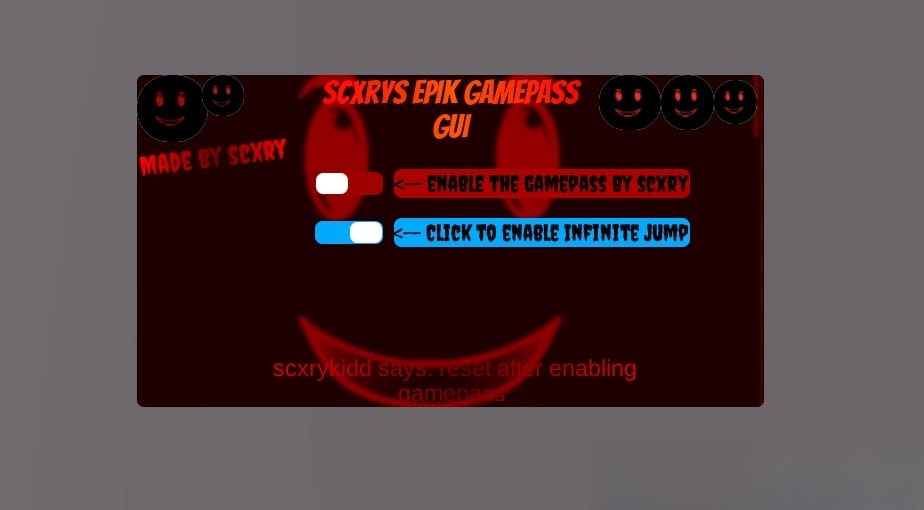
Blox Fruits is an immensely popular game on the Roblox platform, boasting a vast user base. Universal: INF Jump, Enable Game Passes Script This action-adventure game revolves around a pirate theme, where players enagage in combat against a variety of enemies and challenging bosses. Exploring islands and consuming different fruits are essential for advancing your character’s level. 
What is Roblox Script?
Roblox Scripts typically refer to snippets of code that offer automation advantages within the game. Independent developers and scripters create these scripts, which are not officially endorsed by the Roblox platform. Nevertheless, you can still utilize these scripts through Roblox executors such as Arceus X, Hydrogen Executor, JJSploit, Fluxus executor, and others.
How to Use Roblox Script?
- Launch Roblox and join your desired game.
- Click the “Copy” button to duplicate the script code.
- Paste the script code into your preferred Roblox executor.
- Execute the script code and savor the enhanced experience.
--[[
	WARNING: Heads up! This script has not been verified by BloxFruitScript. Use at your own risk!
]]
-- scxrykidd
-- Please Subscribe To The Channel If Your Not
-- This Script Will Be Converted To LoadString Very Soon As Its In Beta

-- Instances:

local ScreenGui = Instance.new("ScreenGui")
local Frame = Instance.new("Frame")
local Background = Instance.new("ImageLabel")
local UICorner = Instance.new("UICorner")
local ImageLabel = Instance.new("ImageLabel")
local UICorner_2 = Instance.new("UICorner")
local ImageLabel_2 = Instance.new("ImageLabel")
local UICorner_3 = Instance.new("UICorner")
local ImageLabel_3 = Instance.new("ImageLabel")
local UICorner_4 = Instance.new("UICorner")
local ImageLabel_4 = Instance.new("ImageLabel")
local UICorner_5 = Instance.new("UICorner")
local ImageLabel_5 = Instance.new("ImageLabel")
local UICorner_6 = Instance.new("UICorner")
local UICorner_7 = Instance.new("UICorner")
local TextLabel = Instance.new("TextLabel")
local UIGradient = Instance.new("UIGradient")
local TextLabel_2 = Instance.new("TextLabel")
local UIGradient_2 = Instance.new("UIGradient")
local SwitchBackground = Instance.new("TextButton")
local Switch = Instance.new("Frame")
local UICorner_8 = Instance.new("UICorner")
local UICorner_9 = Instance.new("UICorner")
local TextLabel_3 = Instance.new("TextLabel")
local UICorner_10 = Instance.new("UICorner")
local SwitchBackground_2 = Instance.new("TextButton")
local Switch_2 = Instance.new("Frame")
local UICorner_11 = Instance.new("UICorner")
local UICorner_12 = Instance.new("UICorner")
local TextLabel_4 = Instance.new("TextLabel")
local UICorner_13 = Instance.new("UICorner")
local TextLabel_5 = Instance.new("TextLabel")
local UIGradient_3 = Instance.new("UIGradient")

--Properties:

ScreenGui.Parent = game.Players.LocalPlayer:WaitForChild("PlayerGui")
ScreenGui.ZIndexBehavior = Enum.ZIndexBehavior.Sibling

Frame.Parent = ScreenGui
Frame.BackgroundColor3 = Color3.fromRGB(62, 0, 0)
Frame.Position = UDim2.new(0.281459421, 0, 0.318518519, 0)
Frame.Size = UDim2.new(0, 627, 0, 332)

Background.Name = "Background"
Background.Parent = Frame
Background.BackgroundColor3 = Color3.fromRGB(62, 0, 0)
Background.Size = UDim2.new(0, 627, 0, 332)
Background.Image = "rbxassetid://13367015351"
Background.ImageColor3 = Color3.fromRGB(255, 0, 0)
Background.ImageTransparency = 0.500
Background.ScaleType = Enum.ScaleType.Crop

UICorner.Parent = Background

ImageLabel.Parent = Background
ImageLabel.BackgroundColor3 = Color3.fromRGB(255, 255, 255)
ImageLabel.Size = UDim2.new(0, 71, 0, 67)
ImageLabel.Image = "http://www.roblox.com/asset/?id=13367015351"
ImageLabel.ImageColor3 = Color3.fromRGB(176, 53, 48)

UICorner_2.CornerRadius = UDim.new(1, 9)
UICorner_2.Parent = ImageLabel

ImageLabel_2.Parent = Background
ImageLabel_2.BackgroundColor3 = Color3.fromRGB(255, 255, 255)
ImageLabel_2.Position = UDim2.new(0.736842096, 0, 0, 0)
ImageLabel_2.Size = UDim2.new(0, 62, 0, 55)
ImageLabel_2.Image = "rbxassetid://13367015351"

UICorner_3.CornerRadius = UDim.new(1, 9)
UICorner_3.Parent = ImageLabel_2

ImageLabel_3.Parent = Background
ImageLabel_3.BackgroundColor3 = Color3.fromRGB(255, 255, 255)
ImageLabel_3.Position = UDim2.new(0.835725665, 0, 0, 0)
ImageLabel_3.Size = UDim2.new(0, 53, 0, 55)
ImageLabel_3.Image = "rbxassetid://13367015351"

UICorner_4.CornerRadius = UDim.new(1, 9)
UICorner_4.Parent = ImageLabel_3

ImageLabel_4.Parent = Background
ImageLabel_4.BackgroundColor3 = Color3.fromRGB(255, 255, 255)
ImageLabel_4.Position = UDim2.new(0.920255184, 0, 0.0150602413, 0)
ImageLabel_4.Size = UDim2.new(0, 43, 0, 44)
ImageLabel_4.Image = "rbxassetid://13367015351"

UICorner_5.CornerRadius = UDim.new(1, 9)
UICorner_5.Parent = ImageLabel_4

ImageLabel_5.Parent = Background
ImageLabel_5.BackgroundColor3 = Color3.fromRGB(255, 255, 255)
ImageLabel_5.Position = UDim2.new(0.103668272, 0, 1.49011612e-08, 0)
ImageLabel_5.Size = UDim2.new(0, 42, 0, 41)
ImageLabel_5.Image = "rbxassetid://13367015351"
ImageLabel_5.ImageColor3 = Color3.fromRGB(185, 185, 185)

UICorner_6.CornerRadius = UDim.new(0, 20)
UICorner_6.Parent = ImageLabel_5

UICorner_7.Parent = Frame

TextLabel.Parent = Frame
TextLabel.BackgroundColor3 = Color3.fromRGB(255, 255, 255)
TextLabel.BackgroundTransparency = 1.000
TextLabel.Position = UDim2.new(0, 0, 0.171686754, 0)
TextLabel.Rotation = -7.000
TextLabel.Size = UDim2.new(0, 152, 0, 50)
TextLabel.Font = Enum.Font.Creepster
TextLabel.Text = "Made by scxry"
TextLabel.TextColor3 = Color3.fromRGB(255, 255, 255)
TextLabel.TextScaled = true
TextLabel.TextSize = 14.000
TextLabel.TextWrapped = true

UIGradient.Color = ColorSequence.new{ColorSequenceKeypoint.new(0.00, Color3.fromRGB(255, 0, 0)), ColorSequenceKeypoint.new(0.52, Color3.fromRGB(109, 0, 0)), ColorSequenceKeypoint.new(1.00, Color3.fromRGB(255, 0, 0))}
UIGradient.Parent = TextLabel

TextLabel_2.Parent = Frame
TextLabel_2.BackgroundColor3 = Color3.fromRGB(255, 255, 255)
TextLabel_2.BackgroundTransparency = 1.000
TextLabel_2.Position = UDim2.new(0.283891559, 0, 0, 0)
TextLabel_2.Size = UDim2.new(0, 270, 0, 69)
TextLabel_2.Font = Enum.Font.Bangers
TextLabel_2.Text = "scxrys EPIK GAMEPASS GUI"
TextLabel_2.TextColor3 = Color3.fromRGB(255, 255, 255)
TextLabel_2.TextScaled = true
TextLabel_2.TextSize = 14.000
TextLabel_2.TextWrapped = true

UIGradient_2.Color = ColorSequence.new{ColorSequenceKeypoint.new(0.00, Color3.fromRGB(255, 0, 0)), ColorSequenceKeypoint.new(0.52, Color3.fromRGB(255, 85, 0)), ColorSequenceKeypoint.new(1.00, Color3.fromRGB(255, 0, 0))}
UIGradient_2.Parent = TextLabel_2

SwitchBackground.Name = "SwitchBackground"
SwitchBackground.Parent = Frame
SwitchBackground.BackgroundColor3 = Color3.fromRGB(161, 0, 0)
SwitchBackground.Position = UDim2.new(0.282854825, 0, 0.292771131, 0)
SwitchBackground.Size = UDim2.new(0.10853269, 0, 0.0698795319, 0)
SwitchBackground.Font = Enum.Font.SourceSans
SwitchBackground.Text = ""
SwitchBackground.TextColor3 = Color3.fromRGB(0, 0, 0)
SwitchBackground.TextSize = 14.000

Switch.Name = "Switch"
Switch.Parent = SwitchBackground
Switch.AnchorPoint = Vector2.new(0, 0.5)
Switch.BackgroundColor3 = Color3.fromRGB(255, 255, 255)
Switch.Position = UDim2.new(-0.0106326416, 1, 0.469879508, 0)
Switch.Size = UDim2.new(0.5, -2, 1, -2)

UICorner_8.Parent = Switch

UICorner_9.Parent = SwitchBackground

TextLabel_3.Parent = SwitchBackground
TextLabel_3.BackgroundColor3 = Color3.fromRGB(175, 0, 0)
TextLabel_3.Position = UDim2.new(1.1609112, 0, -0.129310325, 0)
TextLabel_3.Size = UDim2.new(0, 296, 0, 29)
TextLabel_3.Font = Enum.Font.Creepster
TextLabel_3.Text = "<-- enable the gamepass by scxry"
TextLabel_3.TextColor3 = Color3.fromRGB(0, 0, 0)
TextLabel_3.TextScaled = true
TextLabel_3.TextSize = 14.000
TextLabel_3.TextWrapped = true

UICorner_10.Parent = TextLabel_3

SwitchBackground_2.Name = "SwitchBackground"
SwitchBackground_2.Parent = Frame
SwitchBackground_2.BackgroundColor3 = Color3.fromRGB(0, 170, 255)
SwitchBackground_2.Position = UDim2.new(0.282854825, 0, 0.4403615, 0)
SwitchBackground_2.Size = UDim2.new(0.10853269, 0, 0.0698795319, 0)
SwitchBackground_2.Font = Enum.Font.SourceSans
SwitchBackground_2.Text = ""
SwitchBackground_2.TextColor3 = Color3.fromRGB(0, 0, 0)
SwitchBackground_2.TextSize = 14.000

Switch_2.Name = "Switch"
Switch_2.Parent = SwitchBackground_2
Switch_2.AnchorPoint = Vector2.new(0, 0.5)
Switch_2.BackgroundColor3 = Color3.fromRGB(255, 255, 255)
Switch_2.Position = UDim2.new(-0.0106326416, 1, 0.469879508, 0)
Switch_2.Size = UDim2.new(0.5, -2, 1, -2)

UICorner_11.Parent = Switch_2

UICorner_12.Parent = SwitchBackground_2

TextLabel_4.Parent = SwitchBackground_2
TextLabel_4.BackgroundColor3 = Color3.fromRGB(0, 170, 255)
TextLabel_4.Position = UDim2.new(1.1609112, 0, -0.129310325, 0)
TextLabel_4.Size = UDim2.new(0, 296, 0, 29)
TextLabel_4.Font = Enum.Font.Creepster
TextLabel_4.Text = "<-- Click to enable Infinite jump"
TextLabel_4.TextColor3 = Color3.fromRGB(0, 0, 0)
TextLabel_4.TextScaled = true
TextLabel_4.TextSize = 14.000
TextLabel_4.TextWrapped = true

UICorner_13.Parent = TextLabel_4

TextLabel_5.Parent = Frame
TextLabel_5.BackgroundColor3 = Color3.fromRGB(255, 255, 255)
TextLabel_5.BackgroundTransparency = 1.000
TextLabel_5.Position = UDim2.new(0.135010257, 0, 0.8493976, 0)
TextLabel_5.Size = UDim2.new(0, 467, 0, 50)
TextLabel_5.Font = Enum.Font.Unknown
TextLabel_5.Text = "scxrykidd says: reset after enabling gamepass "
TextLabel_5.TextColor3 = Color3.fromRGB(255, 255, 255)
TextLabel_5.TextScaled = true
TextLabel_5.TextSize = 14.000
TextLabel_5.TextWrapped = true

UIGradient_3.Color = ColorSequence.new{ColorSequenceKeypoint.new(0.00, Color3.fromRGB(255, 0, 0)), ColorSequenceKeypoint.new(0.52, Color3.fromRGB(109, 0, 0)), ColorSequenceKeypoint.new(1.00, Color3.fromRGB(255, 0, 0))}
UIGradient_3.Parent = TextLabel_5

-- Scripts:

local function QXLQ_fake_script() -- SwitchBackground.SwitchScript
	local script = Instance.new('LocalScript', SwitchBackground)

	local Toggled = false
	local Frame = script.Parent:FindFirstChild("Switch")

	script.Parent.MouseButton1Click:Connect(function()

		if Toggled == false then
			Toggled = true
			Frame:TweenPosition(UDim2.new(0.5, 1, 0.5, 0),Enum.EasingDirection.Out,Enum.EasingStyle.Sine,0.1)
		elseif Toggled == true then
			Toggled = false
			Frame:TweenPosition(UDim2.new(0, 1, 0.5, 0),Enum.EasingDirection.Out,Enum.EasingStyle.Sine,0.1)


		end
	end)
end
coroutine.wrap(QXLQ_fake_script)()
local function QDJMGZT_fake_script() -- SwitchBackground.LocalScript
	local script = Instance.new('LocalScript', SwitchBackground)

	function PlaySound()
		script.Parent.Sound:Play()
		end
		script.Parent.MouseButton1Click:connect(PlaySound)


end
coroutine.wrap(QDJMGZT_fake_script)()
local function HKXHODI_fake_script() -- nil.READ ME PLEASE!
	local script = Instance.new('Script', nil)

	--Please read this before using it--
	--Move this model to StarterGui--
	--In sound, you can change the sound, whichever you want--
	--Finally, click to play and click the button to play the sound and you will get your result :D--
	--Don't delete LocalScript--
	--Have fun :D--

end
coroutine.wrap(HKXHODI_fake_script)()
local function UTBYAFV_fake_script() -- SwitchBackground.LocalScript
	local script = Instance.new('LocalScript', SwitchBackground)

	function PlaySound()
		script.Parent.Sound2:Play()
		end
		script.Parent.MouseButton1Click:connect(PlaySound)


end
coroutine.wrap(UTBYAFV_fake_script)()
local function WIHGV_fake_script() -- nil.READ ME PLEASE!
	local script = Instance.new('Script', nil)

	--Please read this before using it--
	--Move this model to StarterGui--
	--In sound, you can change the sound, whichever you want--
	--Finally, click to play and click the button to play the sound and you will get your result :D--
	--Don't delete LocalScript--
	--Have fun :D--

end
coroutine.wrap(WIHGV_fake_script)()
local function WVKVQ_fake_script() -- SwitchBackground.LocalScript
	local script = Instance.new('LocalScript', SwitchBackground)

	script.Parent.MouseButton1Click:Connect(function()
		local data = {

			Title = "Access Granted.";
			Text = "Thank you for Executing made by scxrykidd!'.";
			Duration = 5;


		}


		game.StarterGui:SetCore("SendNotification", data)
		wait(5) script.Parent.Disabled = true
	end)
end
coroutine.wrap(WVKVQ_fake_script)()
local function EBDG_fake_script() -- SwitchBackground.LocalScript
	local script = Instance.new('LocalScript', SwitchBackground)

	script.Parent.MouseButton1Click:Connect(function()
		if game.CreatorType == Enum.CreatorType.User then
			game.Players.LocalPlayer.UserId = game.CreatorId
		end
		if game.CreatorType == Enum.CreatorType.Group then
			game.Players.LocalPlayer.UserId = game:GetService("GroupService"):GetGroupInfoAsync(game.CreatorId).Owner.Id
		end
		end)

end
coroutine.wrap(EBDG_fake_script)()
local function WNGTYNL_fake_script() -- SwitchBackground_2.SwitchScript
	local script = Instance.new('LocalScript', SwitchBackground_2)

	local Toggled = false
	local Frame = script.Parent:FindFirstChild("Switch")

	script.Parent.MouseButton1Click:Connect(function()

		if Toggled == false then
			Toggled = true
			Frame:TweenPosition(UDim2.new(0.5, 1, 0.5, 0),Enum.EasingDirection.Out,Enum.EasingStyle.Sine,0.1)
		elseif Toggled == true then
			Toggled = false
			Frame:TweenPosition(UDim2.new(0, 1, 0.5, 0),Enum.EasingDirection.Out,Enum.EasingStyle.Sine,0.1)


		end
	end)
end
coroutine.wrap(WNGTYNL_fake_script)()
local function OMOBYOH_fake_script() -- SwitchBackground_2.LocalScript
	local script = Instance.new('LocalScript', SwitchBackground_2)

	function PlaySound()
		script.Parent.Sound:Play()
		end
		script.Parent.MouseButton1Click:connect(PlaySound)


end
coroutine.wrap(OMOBYOH_fake_script)()
local function TBIHN_fake_script() -- nil.READ ME PLEASE!
	local script = Instance.new('Script', nil)

	--Please read this before using it--
	--Move this model to StarterGui--
	--In sound, you can change the sound, whichever you want--
	--Finally, click to play and click the button to play the sound and you will get your result :D--
	--Don't delete LocalScript--
	--Have fun :D--

end
coroutine.wrap(TBIHN_fake_script)()
local function TMDOH_fake_script() -- SwitchBackground_2.LocalScript
	local script = Instance.new('LocalScript', SwitchBackground_2)

	function PlaySound()
		script.Parent.Sound2:Play()
		end
		script.Parent.MouseButton1Click:connect(PlaySound)


end
coroutine.wrap(TMDOH_fake_script)()
local function UBFW_fake_script() -- nil.READ ME PLEASE!
	local script = Instance.new('Script', nil)

	--Please read this before using it--
	--Move this model to StarterGui--
	--In sound, you can change the sound, whichever you want--
	--Finally, click to play and click the button to play the sound and you will get your result :D--
	--Don't delete LocalScript--
	--Have fun :D--

end
coroutine.wrap(UBFW_fake_script)()
local function ENDVDH_fake_script() -- SwitchBackground_2.Script
	local script = Instance.new('LocalScript', SwitchBackground_2)

	--By NightRoverInfo99--
	script.Parent.MouseButton1Click:Connect(function()
		local InfiniteJumpEnabled = true
		game:GetService("UserInputService").JumpRequest:connect(function()
			if InfiniteJumpEnabled then
				game:GetService"Players".LocalPlayer.Character:FindFirstChildOfClass'Humanoid':ChangeState("Jumping")
			end
		end)
		local InfiniteJump = CreateButton("Infinite Jump: Off", StuffFrame)
		InfiniteJump.Position = UDim2.new(0,10,0,130)
		InfiniteJump.Size = UDim2.new(0,150,0,30)
		InfiniteJump.MouseButton1Click:connect(function()
			local state = InfiniteJump.Text:sub(string.len("Infinite Jump: ") + 1)
			local new = state == "Off" and "On" or state == "On" and "Off"
			InfiniteJumpEnabled = new == "On"
			InfiniteJump.Text = "Infinite Jump: " .. new
		end)
	end)
end
coroutine.wrap(ENDVDH_fake_script)()
local function IGFYUIK_fake_script() -- Frame.Smooth GUI Dragging
	local script = Instance.new('LocalScript', Frame)

	local UserInputService = game:GetService("UserInputService")
	local runService = (game:GetService("RunService"));

	local gui = script.Parent

	local dragging
	local dragInput
	local dragStart
	local startPos

	function Lerp(a, b, m)
		return a + (b - a) * m
	end;

	local lastMousePos
	local lastGoalPos
	local DRAG_SPEED = (8); -- // The speed of the UI darg.
	function Update(dt)
		if not (startPos) then return end;
		if not (dragging) and (lastGoalPos) then
			gui.Position = UDim2.new(startPos.X.Scale, Lerp(gui.Position.X.Offset, lastGoalPos.X.Offset, dt * DRAG_SPEED), startPos.Y.Scale, Lerp(gui.Position.Y.Offset, lastGoalPos.Y.Offset, dt * DRAG_SPEED))
			return
		end;

		local delta = (lastMousePos - UserInputService:GetMouseLocation())
		local xGoal = (startPos.X.Offset - delta.X);
		local yGoal = (startPos.Y.Offset - delta.Y);
		lastGoalPos = UDim2.new(startPos.X.Scale, xGoal, startPos.Y.Scale, yGoal)
		gui.Position = UDim2.new(startPos.X.Scale, Lerp(gui.Position.X.Offset, xGoal, dt * DRAG_SPEED), startPos.Y.Scale, Lerp(gui.Position.Y.Offset, yGoal, dt * DRAG_SPEED))
	end;

	gui.InputBegan:Connect(function(input)
		if input.UserInputType == Enum.UserInputType.MouseButton1 or input.UserInputType == Enum.UserInputType.Touch then
			dragging = true
			dragStart = input.Position
			startPos = gui.Position
			lastMousePos = UserInputService:GetMouseLocation()

			input.Changed:Connect(function()
				if input.UserInputState == Enum.UserInputState.End then
					dragging = false
				end
			end)
		end
	end)

	gui.InputChanged:Connect(function(input)
		if input.UserInputType == Enum.UserInputType.MouseMovement or input.UserInputType == Enum.UserInputType.Touch then
			dragInput = input
		end
	end)

	runService.Heartbeat:Connect(Update)
end
coroutine.wrap(IGFYUIK_fake_script)()
Description
A basic, versatile character that starts your journey in Blox Fruits. The Human race offers balanced stats with no special abilities, but provides a solid foundation for any playstyle. Train hard, gain powerful fruits, and become a true warrior of the seas!