
Blox Fruits is an immensely popular game on the Roblox platform, boasting a vast user base. This action-adventure game revolves around a pirate theme, where players engage in combat against a variety of enemies and challenging bosses. Exploring islands and consuming different fruits are essential for advancing your character’s level. 
What is Roblox Script?
Roblox Scripts typically refer to snippets of code that offer automation advantages within the game. Independent developers and scripters create these scripts, which are not officially endorsed by the Roblox platform. Nevertheless, you can still utilize these scripts through Roblox executors such as Arceus X, Hydrogen Executor, JJSploit, Fluxus executor, and others.
How to Use Roblox Script?
- Launch Roblox and join your desired game.
- Click the “Copy” button to duplicate the script code.
- Paste the script code into your preferred Roblox executor.
- Execute the script code and savor the enhanced experience
Blox Fruits is an immensely popular game on the Roblox platform, boasting a vast user base. This action-adventure game revolves around a pirate theme, where players engage in combat against a variety of enemies and challenging bosses. Exploring islands and consuming different fruits are essential for advancing your character’s level.
local ScreenGui = Instance.new("ScreenGui")
local Frame = Instance.new("Frame")
local Title = Instance.new("TextLabel")
local CloseButton = Instance.new("TextButton")
local Options = Instance.new("ScrollingFrame")
ScreenGui.Name = ""
ScreenGui.Parent = game.Players.LocalPlayer:WaitForChild("PlayerGui")
ScreenGui.ResetOnSpawn = false
Frame.Parent = ScreenGui
Frame.Size = UDim2.new(0, 300, 0, 400)
Frame.Position = UDim2.new(0.5, -150, 0.5, -200)
Frame.BackgroundColor3 = Color3.fromRGB(30, 30, 30)
Frame.BorderSizePixel = 0
Frame.ClipsDescendants = true
Title.Name = "TitleLabel"
Title.Parent = Frame
Title.Size = UDim2.new(1, 0, 0, 50)
Title.BackgroundColor3 = Color3.fromRGB(30, 30, 30)
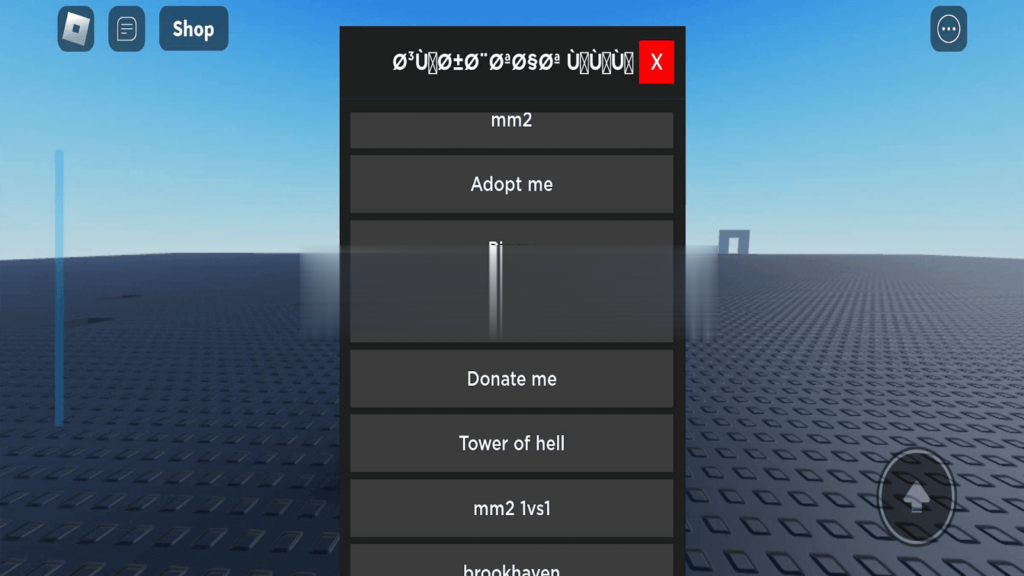
Title.Text = "سكربتات نهى"
Title.Font = Enum.Font.GothamBold
Title.TextSize = 18
Title.TextColor3 = Color3.fromRGB(255, 255, 255)
CloseButton.Name = "CloseButton"
CloseButton.Parent = Frame
CloseButton.AnchorPoint = Vector2.new(1, 0)
CloseButton.Size = UDim2.new(0, 30, 0, 30)
CloseButton.Position = UDim2.new(1, -10, 0, 10)
CloseButton.BackgroundColor3 = Color3.fromRGB(255, 0, 0)
CloseButton.BorderSizePixel = 0
CloseButton.Font = Enum.Font.GothamSemibold
CloseButton.Text = "X"
CloseButton.TextSize = 18
CloseButton.TextColor3 = Color3.fromRGB(255, 255, 255)
CloseButton.AutoButtonColor = false
Options.Name = "Options"
Options.Parent = Frame
Options.Size = UDim2.new(1, 0, 1, -60)
Options.Position = UDim2.new(0, 0, 0, 60)
Options.BackgroundTransparency = 1
Options.ScrollBarThickness = 8
local function AddOption(text, callback)
local OptionButton = Instance.new("TextButton")
OptionButton.Name = "OptionButton"
OptionButton.Parent = Options
OptionButton.Size = UDim2.new(1, -20, 0, 40)
OptionButton.Position = UDim2.new(0, 10, 0, (#Options:GetChildren() - 1) * 45)
OptionButton.BackgroundColor3 = Color3.fromRGB(60, 60, 60)
OptionButton.BorderSizePixel = 0
OptionButton.Font = Enum.Font.GothamSemibold
OptionButton.Text = text
OptionButton.TextSize = 16
OptionButton.TextColor3 = Color3.fromRGB(255, 255, 255)
OptionButton.AutoButtonColor = false
OptionButton.MouseButton1Click:Connect(callback)
end
-- إضاÙØ© خيارات
AddOption("سكربتات هدية ♡", function()
end)
AddOption("طيران ", function()
loadstring(game:HttpGet("https://pastebin.com/raw/MHE1cbWF"))()
end)
AddOption("القÙÙ„", function()
loadstring(game:HttpGet('https://pastebin.com/raw/WQ9NPeDS'))()
end)
AddOption("مشيات", function()
loadstring(game:HttpGet("https://raw.githubusercontent.com/GamingScripter/Animation-Hub/main/Animation%20Gui", true))()
end)
AddOption("رقصات", function()
loadstring(game:HttpGet("https://pastebin.com/raw/eCpipCTH"))()
end)
AddOption("", function()
end)
AddOption("~~ السكربتات ~~", function()
end)
AddOption("mm2", function()
loadstring(game:HttpGet("https://raw.githubusercontent.com/hassantheking123321/Everybody/main/My%20hub"))();
end)
AddOption("Adopt me", function()
loadstring(game:HttpGet("https://raw.githubusercontent.com/IceMael7/NewIceHub/main/Brookhaven"))()
end)
AddOption("Piggy", function()
loadstring(game:HttpGet("https://raw.githubusercontent.com/RegularVynixu/Vynixius/main/Piggy/Loader.lua"))()
end)
AddOption("Pet simulation", function()
loadstring(game:HttpGet("https://raw.githubusercontent.com/HazeNx/Euphoria/main/EuphoriaHUB.lua"))()
end)
AddOption("Donate me", function()
loadstring(game:HttpGet(('https://pastebin.com/raw/f0a3yune')))()
end)
AddOption("Tower of hell", function()
loadstring(game:HttpGet("https://raw.githubusercontent.com/GamingScripter/scripts/main/TOH", true))()
end)
AddOption("mm2 1vs1", function()
end)
AddOption("brookhaven", function()
loadstring(game:HttpGet("https://raw.githubusercontent.com/Abdullah16661/C0cAiNe/main/launcher.lua"))()
end)
CloseButton.MouseButton1Click:Connect(function()
ScreenGui:Destroy()
end)
local UserInputService = game:GetService("UserInputService")
local dragging
local dragStart
local startPos
local function update(input)
local delta = input.Position - dragStart
ScreenGui.Position = UDim2.new(startPos.X.Scale, startPos.X.Offset + delta.X, startPos.Y.Scale, startPos.Y.Offset + delta.Y)
end
Frame.InputBegan:Connect(function(input)
if input.UserInputType == Enum.UserInputType.Touch then
dragging = true
dragStart = input.Position
startPos = ScreenGui.Position
input.Changed:Connect(function()
if input.UserInputState == Enum.UserInputState.End then
dragging = false
end
end)
end
end)
